For Chrome, Edge, Brave, and other Chromium-based browsers

Smart Tabs

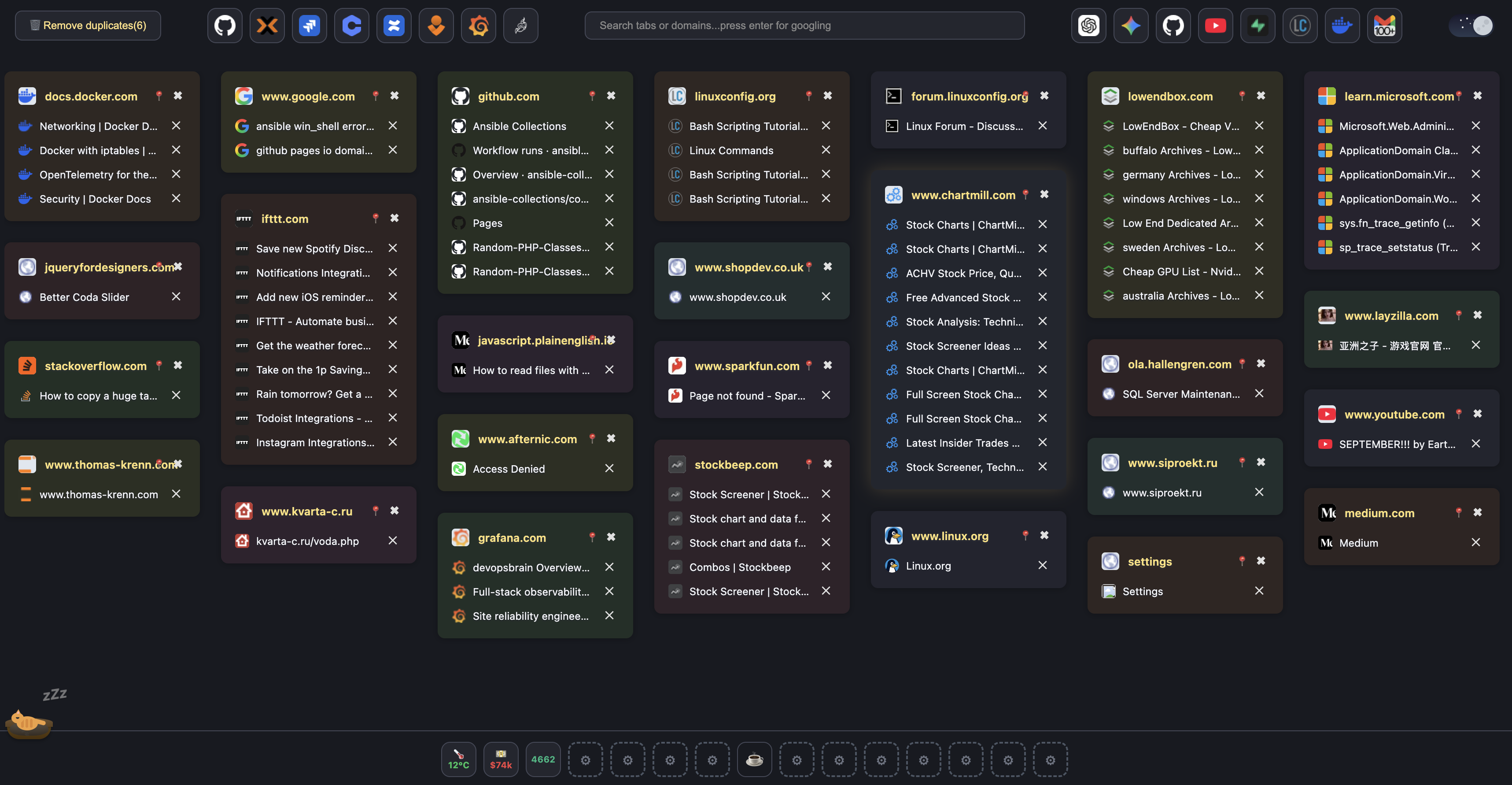
Smart Tabs replaces your new tab page with a sleek, powerful dashboard that brings order to your browser. It automatically groups all your open tabs by website, making it effortless to find, switch, or close tabs with a single click. Pin your go-to sites, search across all tabs, and enjoy a beautifully organized browsing experience — complete with dark mode and intuitive controls.

  • Create your own widgets and use the Quick Dial panel
  • Tabs grouped by site — search, pin, switch, or close in one place
  • Light and dark themes, duplicate cleanup, and more
Smart Tabs panel — tabs grouped by site, search bar, and widgets
New tab dashboard — grouped tabs, widgets, Quick Dial, and search

Key features

  • Create your own widgets

    Build and arrange widgets on your new tab dashboard.

  • Quick Dial panel

    Fast access to the sites you use most.

  • Grouped by domain

    Open tabs are intelligently grouped by domain, giving you a clean, structured view of your browsing activity.

  • Favicons and color coding

    Each tab group shows the site’s favicon and is color-coded for faster identification.

  • Switch tabs instantly

    Jump to any open tab from the dashboard with a single click.

  • Close tabs or whole groups

    Close individual tabs or entire groups in one click.

  • Pin favorites

    Pin favorite domains or groups for easy access.

  • Search and filter

    Quickly find tabs by title, URL, or domain using the built-in search and filter tools.

  • Light and dark themes

    Toggle between light and dark themes to match your environment or preference.

  • Remove duplicates

    Clean up duplicate tabs so your list stays tidy.

  • Wake the cat

    Wake up the cat to show old visited tabs.

Widgets

Example data sources for widgets — PromQL, public APIs, and geocoding + weather.

Prometheus metric

Widget

Prometheus (PromQL) query and parsing the response for a numeric widget.

Icon
const query = 'sum(increase(ota_apps_search_request_api_total[1m]))';
const res = await fetchData(
  'http://prometheus?query=' + encodeURIComponent(query)
);
const data = JSON.parse(res);
const val = data.data.result[0]?.value[1];
const rounded = Math.round(Number(val));
return { value: rounded, label: 'Reqs/5m', color: '#10b981' };

BTC price (Coinbase)

Widget

Bitcoin spot price and formatting with a colour threshold.

Icon
const res = await fetchData('https://api.coinbase.com/v2/prices/BTC-USD/spot');
const data = JSON.parse(res);
const price = Math.round(Number(data.data.amount));
const formatted = price >= 1000 ? Math.round(price / 1000) + 'k' : price;
return { value: '$' + formatted, label: 'BTC', color: price >= 80000 ? '#22c55e' : '#ef4444' };

Weather by city

Widget

Open-Meteo geocoding and current forecast — temperature and “feels like”.

Icon
const city = 'St Petersburg';
const geoRes = await fetchData(
  'https://geocoding-api.open-meteo.com/v1/search?name=' + encodeURIComponent(city) + '&count=1'
);
const geo = JSON.parse(geoRes);
if (!geo.results?.length) {
  return { value: '—', label: 'City not found', color: '#ef4444' };
}
const { latitude, longitude, name, country_code } = geo.results[0];
const res = await fetchData(
  'https://api.open-meteo.com/v1/forecast?latitude=' +
    latitude +
    '&longitude=' +
    longitude +
    '&current=temperature_2m,apparent_temperature&timezone=auto'
);
const data = JSON.parse(res);
const t = Math.round(data.current.temperature_2m);
const feels = Math.round(data.current.apparent_temperature);
return {
  value: t + '°C',
  label: name + ', ' + country_code + ' · feels ' + feels + '°',
  color: t > 15 ? '#f59e0b' : t > 0 ? '#22c55e' : '#3b82f6',
};

Trust and transparency

The extension runs in your browser; publish policy details when you ship.

  • Your data stays with you

    Describe how page content is handled — users expect a clear privacy policy.

  • Chromium family

    Built for Chrome and other Chromium browsers. Safari/Firefox when you add support.

  • Openness

    Publish a policy and contact — it helps people trust an extension from the store.

Ready to try Smart Tabs?

One-click install from the official extension store.

Install extension